Can You Make Subfolders in Claude? (Not Natively — Here's the Fix)
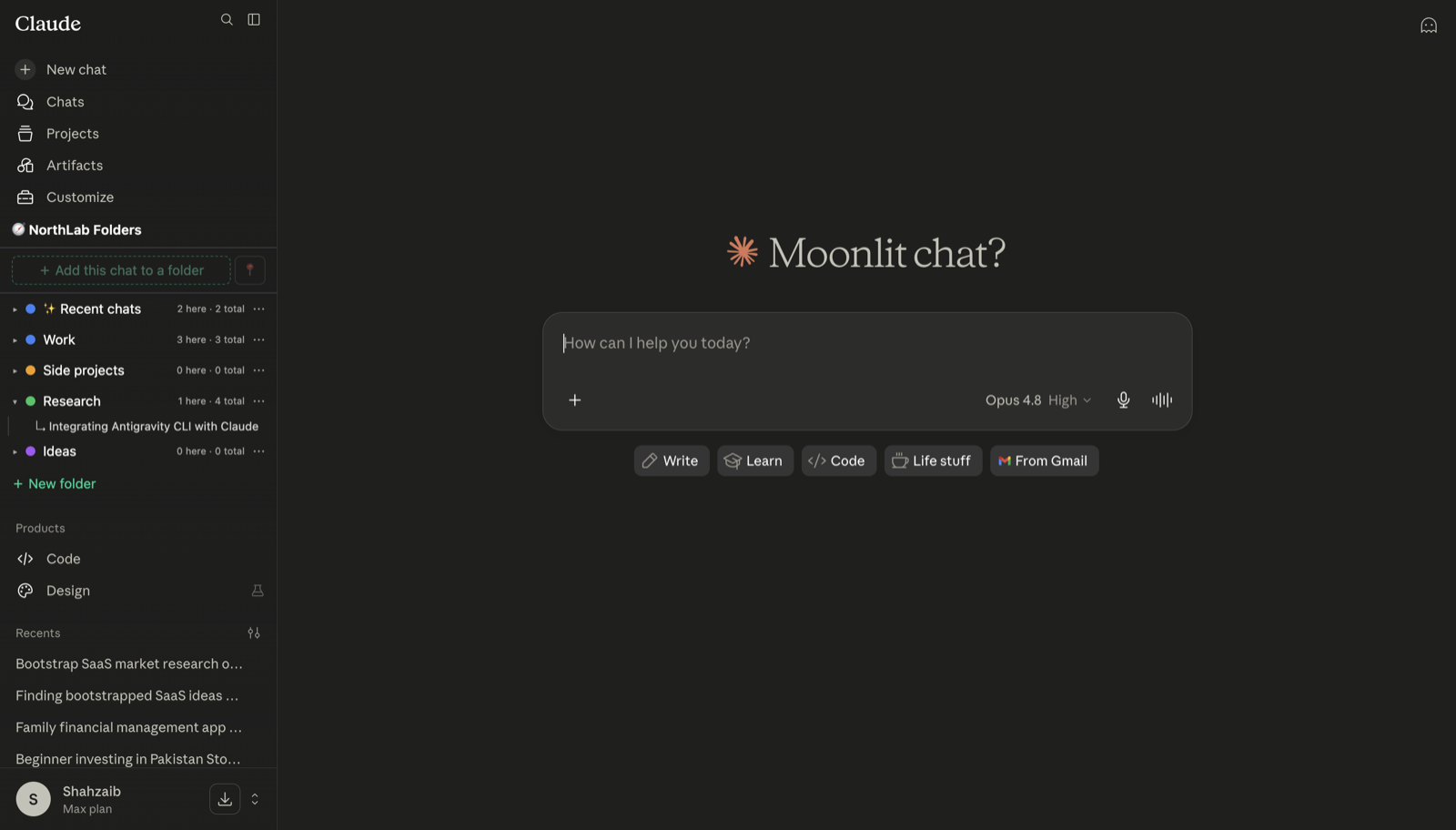
Short answer: no, Claude has no native subfolders — and no native folders either. Projects are the closest thing, and they’re strictly flat: you can’t nest a project inside another project, and you can’t create folders inside a project. I hit this wall myself once my project list passed a dozen entries, and it’s one of the reasons I ended up building an extension to fix it. Here’s the full picture, including the workarounds that actually hold up.
What Claude gives you natively (and where it stops)
Claude Projects group chats and knowledge files into an isolated workspace, which genuinely helps — one project per client, per codebase, per research topic. But inside a project, everything is flat:
- Chats are a single chronological list. No grouping, no pinning, no sub-sections.
- Knowledge files are one pool. Upload twenty files and they sit side by side, whatever directory structure they came from.
- Projects themselves can’t nest. There’s no “Work” project containing “Client A” and “Client B” — just one long project list.
So the hierarchy most people want — Work → Client A → drafts — has nowhere to live in claude.ai out of the box.
Workaround 1: fake it with naming conventions
The zero-install approach: encode the hierarchy in project names. Work / Client A, Work / Client B, Personal / Health. Alphabetical sorting keeps siblings together, and search still finds things.
It works, but it degrades fast. The names get long, the project list gets longer, and nothing stops a quick chat from starting outside any project and vanishing into your history. It’s a labeling scheme, not a structure.
Workaround 2: real folders and subfolders with an extension
This is the gap NorthLab Folders exists to fill. It’s a browser extension that docks a folder panel into Claude’s own sidebar (and ChatGPT’s), styled to match the native UI:
- Install the extension and open claude.ai.
- Create top-level folders — the free tier includes three.
- On a Pro plan, hover a folder and choose Add subfolder to nest one level deep: Work → Client A, Research → Papers.
- File any chat from the sidebar or move chats between folders by drag and drop; pin the ones you return to daily.
Two design choices matter here. Subfolders are depth-1 by design — one level of nesting covers the “category → topic” structure almost everyone actually uses, without turning your sidebar into a file manager. And it’s local-first: the extension stores only folder names and conversation IDs in your browser — never message text — so organizing your chats doesn’t mean sharing them.
Folders also work alongside Projects rather than replacing them: Projects keep doing what they’re good at (shared knowledge files and instructions), while folders organize the conversations themselves — including the quick chats that never belonged to any project.
What about subfolders for files in a Project?
A related question I see a lot: you’re uploading templates or a codebase to a Project and want to preserve the folder structure. Knowledge files flatten on upload — but if the structure matters, upload a ZIP instead: Claude can read a zip’s directory tree and its contents. The full breakdown is in how to upload a whole folder to Claude.
Bottom line
Claude won’t give you subfolders, and nothing suggests that’s changing soon — Projects have stayed flat since launch. Naming conventions get you surprisingly far if your project count stays small. Past that, an extension is the only way to get a real hierarchy, and you can try it free in about two minutes.
Related Claude guides
- How to Add Folders to Claude
- How to Make a Folder of Chats in Claude
- Claude Projects, Explained: Folders, Limits & Setup
- How to Upload a Whole Folder to Claude
- Can Claude Read a Folder of Files?
Frequently asked questions
Can you make subfolders in Claude?
Not natively. Claude Projects are a flat list — you can’t nest a project inside another project, and you can’t create folders inside a project’s chat list. To get real subfolders in claude.ai you need a browser extension: NorthLab Folders adds folders with depth-1 subfolders directly into Claude’s sidebar.
Is it possible to have subfolders in Claude Projects?
No. A Project groups chats and knowledge files into one workspace, but everything inside it is flat — chats are a single chronological list and knowledge files are a single pool. There is no folder tree inside a Project and no way to nest one Project under another.
Can I put folders within a Claude Project?
Not with Claude’s built-in features. The common workarounds are naming conventions (prefixing project names like “Work / Client A”) or an extension that adds a real folder hierarchy on top of Claude’s sidebar, independent of Projects.
Do subfolders keep my conversations private?
With NorthLab Folders, yes — the extension is local-first. It stores only folder names and conversation IDs in your browser, never message text, and sends nothing about your chats to any server.